Saturday, 16 November 2013
Blocking any website on your computer becomes necessary when you really want to make it your personal computer. Many times someone from your family or some irritating friend comes to you and want to use your computer to surf internet and then he start viewing videos on youtube or start chatting on Facebook regardless of whether you are liking it or not but you cant even ask them to leave.

Of course you never want that anyone use your computer for long time and keep using your internet while you just sit aside them to see what they are doing.
You can simply block the sites and prevent them from opening in your system to get rid of this problem. And i have already given post about how to acces blocked website.Get it from the below link
How to Block Websites on your Computer
There are certain Tricks to block a website from opening on your system :
Method 1 : Using Windows host file
For this method , you don’t require any additional software to be installed on your computer. All you need is a little bit knowledge and some basic file editing capability using notepad. Windows has this host file to map the ip addressesand host names of the host sites to your computer.
By using this trick you can make your computer to redirect again to your local machine instead of opening that host site. So for blocking any website using windows host file you need to follow some steps as given below :
Step 1 :
Open “C:\Windows\System32\drivers\etc” in the Windows search bar or navigate to the folder by clicking your way through Windows Explorer.
Step 2 :
Now after reaching to this path you will see a file named Host. Right click on that file and click on open with notepad.
Step 3 :
In Notepad, you will see several lines of text used for mapping purposes. Go to the last line of text (it should say something regarding a local host), now press enter to move the cursor to the end of the file then type “127.0.0.1″ (without codes)and press the spacebar.
Step 4 :
Now, type the specified address of the website you wish to block on the same line. For example, type “127.0.0.1 www.reddit.com” , “127.0.0.1 www.facebook.com” to block all these sites.
Step 5 :
Now Save this file and ignore if you receive any messages showing you warning about this modifications.
All set here. Now you can go to your browser and verify that the site you want to block isn’t opening anymore.
Method 2 : Using control Panel
If you don’t wish to block sites using this host file or there is some problem in modifying that file , so you can do the same thing using another default function of windows i.e. Control Panel Parental Control.
For doing this , just follow a few steps given below and you are done :
Step 1 :
Click on start button > Go to control panel > User accounts and Family safety > Set up parental control for any user.
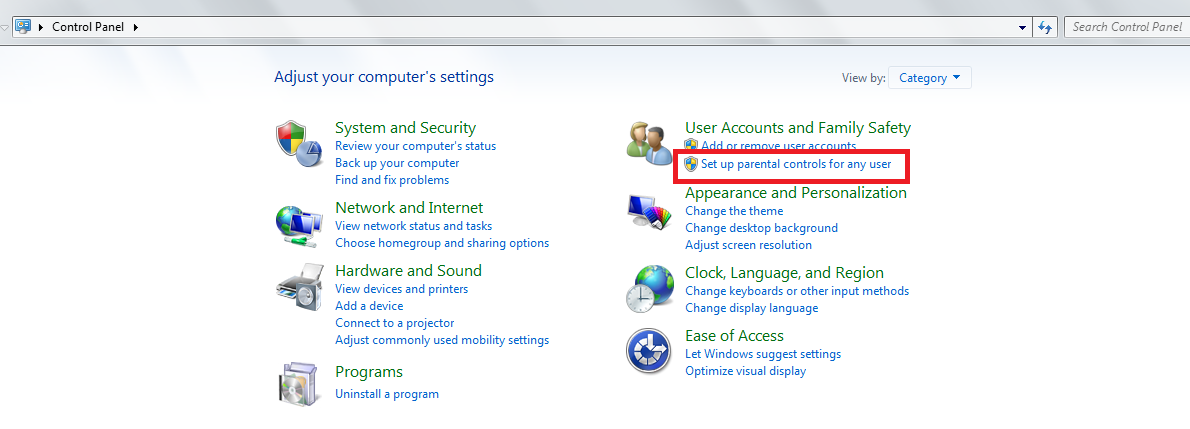
List of all the users in your system will be displayed .
Step 2 :
Now select the account for which you want to set the web filter and then under parental controls , click ON.
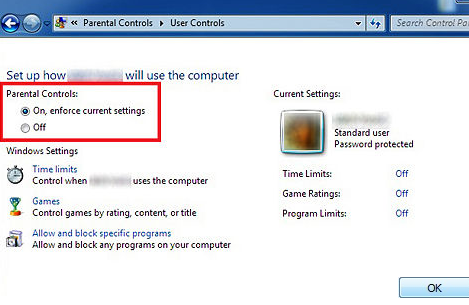
Step 3 : Click on web filter.
Step 4 : Click on Block some websites or contents .
Step 5 : Click on Edit the allow and block list.
Step 6 : In the Website address box, type the address for the website that you want to allow or block, and then click Allow or Block.
These two are the Easy and working Methods to Block websites on your Computer.
This is all guys. Hope you like my post. Please give a comment about this post.Thanks
This is all guys. Hope you like my post. Please give a comment about this post.Thanks
Saturday, 16 November 2013 0
Sunday, 10 November 2013
Hi friends, In this post you will know a trick to speed up ram by using Notepad. You might have lot of problems sometimes that your computer not responding. You can use this trick and avoid that. And it's an easy task to do.

Lets start the process for how to increase speed
- At first open notepad.
- Then type the code bellow.
- FreeMem=Space(64000000)
- Now save the file as ClearRam.vbs
That's it. Open the file (double click) and you are done..
Sunday, 10 November 2013 0
Saturday, 9 November 2013
Pen drives or USB are quite popular in the digital world for instant transfer of data. Using USB flash drives, one can easily transfer large files from one PC to another, from PC to laptop, from laptop to TV, and vice versa. This latest technology has made our work easier than before. In current times, you can move Gigabytes of information into just a tiny pen drive within few seconds.

In recent years, a lot of changes has been made in storage devices. When you compare new pen drives with the older ones, you will notice a considerable high transfer rate in the latest ones. However, there are times when you can get irritated with slow transfer speed of pen drives while copying data in pen drives. Well, this article shall provide you with some tricks using which you can speed up transfer rate of your pen drive.
Factors responsible for data transfer rate:
Before knowing the tricks, we shall have a look at some factors responsible for data transfer rate , and they are as follows.
1.Pen drive ageing: Well, this is common for any device that when it becomes old, the rates gets slower.
2.Type of files: The transfer rate of data also depends on the file type; you might have noticed that songs, videos and documents take very less time in transfer while application files need more time.
3.USB port version: The most popular version of USB is 2.0, and it will give you 35mbps speed. So, if you want fast speed then buy 2.0 version pen drives.
Before knowing the tricks, we shall have a look at some factors responsible for data transfer rate , and they are as follows.
1.Pen drive ageing: Well, this is common for any device that when it becomes old, the rates gets slower.
2.Type of files: The transfer rate of data also depends on the file type; you might have noticed that songs, videos and documents take very less time in transfer while application files need more time.
3.USB port version: The most popular version of USB is 2.0, and it will give you 35mbps speed. So, if you want fast speed then buy 2.0 version pen drives.
Few tricks to Speedup your pendrive Data Transfer Rate:
1.File system should be NTFS: If you want to Speedup Your Pendrive, then make sure you have NTFS as file system. You can do so by Right clicking on your pendrive and selecting Format,Select NTFS File system, Uncheck Quick Format And Click On Start.
2.Disk errors: To check disk errors go to the properties tab of your pen drive, then select ‘tools’ tab. You will find a ‘check now’ button, click it and then hit ‘start’ to fix the errors. The time taken for scan depends on the size of the pen drive.
.png "speed up your pendrive")
3.Device policy: Under properties of your pen drive, select ‘hardware’ tab. Then select USB device from there that will lead you to a pop up window where you need to change settings. You can even have better performance of pen drive by clicking the option under ‘hardware’ tab.
4.Format: This is one of the effective options that many users have tried. When you have used your pen drive for quite a long time, you can speed it up by formatting the device.
The above mentioned were few tricks though big advantages for the speeding of your pen drive. Carefully test your pen drive with the factors given above, and then follow the tricks to Speedup Your Pendrive to a greater extent. In addition to this, you should keep checking for these aspects regularly, say twice or thrice in a month
1.File system should be NTFS: If you want to Speedup Your Pendrive, then make sure you have NTFS as file system. You can do so by Right clicking on your pendrive and selecting Format,Select NTFS File system, Uncheck Quick Format And Click On Start.
2.Disk errors: To check disk errors go to the properties tab of your pen drive, then select ‘tools’ tab. You will find a ‘check now’ button, click it and then hit ‘start’ to fix the errors. The time taken for scan depends on the size of the pen drive.
.png "speed up your pendrive")
4.Format: This is one of the effective options that many users have tried. When you have used your pen drive for quite a long time, you can speed it up by formatting the device.
The above mentioned were few tricks though big advantages for the speeding of your pen drive. Carefully test your pen drive with the factors given above, and then follow the tricks to Speedup Your Pendrive to a greater extent. In addition to this, you should keep checking for these aspects regularly, say twice or thrice in a month
I hope you like my post.Comment if you have any Queries............
Saturday, 9 November 2013 0
Thursday, 7 November 2013
Formatting is a valuable and essential tool when dealing with any type of storage disk and can help to solve a lot of errors and headaches. But what do you do if your USB flash drive needs to be formatted but, every time you try through the property menus it comes up with an error, or won’t even recognise the drive properly at all. Don’t despair because here is something you can do.


Formatting an unformatable Pendrive is a common process that may need to be undertaken quite frequently, but unless you have gone through this procedure before it can be a mine field.And Ihave also posted about about the how to use pen drive as bootable pendrive to instal OS.check it here
The last thing you want is to finish the process and end up with an unusable pendrive .
Here is a quick step by step guide to Format an unformatable Pendrive
The last thing you want is to finish the process and end up with an unusable pendrive .
Here is a quick step by step guide to Format an unformatable Pendrive
Formatting using CMD:
This guide formats your flash drive as FAT32, to format as NTFS simply substitute the term in the command box. FAT32 is the recommended formatting style by this guide but many do prefer NTFS.
Step 1. Turn on computer as normal
Step 2. Once you are in your desktop insert Pendrive into USB port
Please note: if you know the letters associated with your disk locations or can use a utility such as disk part to list this information then skip steps 3 and 4
Step 3. Go into my computer (accessible from the start menu or desktop) and look down the navigation panel on the left hand side, this lists down to the popular and root menu folders and locations on your computer.
Step 4. Your Pendrive should be listed in one of these locations, it may be referred to by brand, as portable storage or something similar. Next to this label will be a letter,
for example “G: removable storage device ” if the device does not show up you may need to test the port to find the letter with another USB device. This letter needs to be written down or remembered in order to complete this process.
Step 5. Go to the windows start menu, click start or the Windows symbol depending on your edition of Windows, then click run.
Step 6. Type cmd into the run dialog box and click OK, this is to start the command prompt window from which you will be able to choose your format style and name your drive.
Step 7. Then the command prompt window is opened and you will need to type “ Format G: “

if you want to Format it as FAT32 then type “ Format G: /FS: FAT32 ”
Step 8. The G in this instance refers to our example Pendrive location, instead you would enter the letter that you remembered or wrote down from the my computer side panel
After you have typed the above command press enter.
Step 9. Here, you will be asked to press enter again and then to give a name for your drive. Follow these prompts then click on enter again.
You have completed the process; go back into my computer to check that the formatting has been completed successfully.And you can use USB as RAM in computer. check it here
Please share it with your friends and give comments if any queries........ thank you.
Please share it with your friends and give comments if any queries........ thank you.
Thursday, 7 November 2013 0
Friday, 1 November 2013
Many find the usage of search engine optimization very confusing and tough to understand. Nevertheless it truly shouldn’t be. If you have the proper guidance, you will know the tools needed and how you can use them. This will optimize your website and boost the site visitors. Preserve reading through these SEO tricks and then the secrets will show itself.

Avoid utilizing Javascript. Your content material will likely be extremely search friendly for search engine spiders. Now when you have to use Javascript within the photos links or menus for reasons you can not avoid, then contain the same links as text on the webpage so it will be less difficult for the SE spiders to locate and index the hyperlinks.
Although you could disagree but Don’t just go with significant search engines. There are lots of other link sites that are set up towards certain directories. These can be employed towards your benefit given that they target a specialized audience. Locate the SE that target your specific niche and then attack it. You’ll find constructed to optimize your consumer base.
Place your self as a professional in the market. This could be a lucrative internet marketing concept. Creating a site that’s developed around a niche of buyers is very essential, then use the Search Engine Optimization tools to help the purchasers or prospect locate the products or services you’ve got to provide. Bear in mind, supply what your clients want and usually do not assume what they want.
You’ve got to understand regardless of whether your efforts are paying off for optimizing your websites efficiency inside the SE. You do that by monitoring your page rank by means of a plugin which could be installed in your google toolbar. It’s vital to monitor what keywords and phrases your guests are getting into to discover your website. You ought to know how to do your Keyword study particular for your niche or your website. Copyright your website! By performing that every person will realize that the content in your site is truly your personal. Search engines take this into consideration for their rating levels, Additionally, it adds a rapport with your clients. People will trust you and since your content material is special and fresh, it aids the credibility along.
Take into consideration thinking about all the synonyms for the key phrases and phrases you might be operating to catch-all of the relevant search queries. In case you are not certain of which words to make use of, try to discover the keyword with a tilde (~) in front of them. For example, ~Fishing will provide you with a selection of keywords.
Setup a method to discover the inbound link for your website, specially from relevant, higher ranked Internetsites. Obviously, everyone’s objective is always to find a way for Wikipedia, most likely the most extremely high ranked website of all, to send us it is link juice. Your objective has to be to find other websites whose subject is in sync with yours to provide you the Page Rank boosting.
In the event you strategy to utilize flash inside your website, use just one. Many of these will take away the concentrate out of your description and world wide webtransfer, also, there is certainly no specific advantage for your search engine optimization. A single flash animation is greater than sufficient to make a modern aura for the website.
It’s completely important for you personally to hyperlink your site to other sites which are related when it comes to content. Should you link the contents that are unrelated, then SE will contemplate your website to become of a poor quality and will not allow you to rank high on the results web page.
A misconception individuals feel are “SEO tricks” is the use of a .com in the web site extension They feel it’s really crucial for search engines. But it’s not! SE don’t have any preference on the extensions of one’s website. In reality the other extension like .information or .net perform equally fine and also saves you money.
Invest on Pay-per-click (PPC) marketing and advertising campaign. It’s often stated, you’ll need to spend cash to earn money and PPC is among the greatest avenues for it. Bid on the search phrase that is related to your niche. This can be among the SEO tricks that could aid position your site within the SE, specially for terms exactly where you do not have a stance in organic site visitors.
As pointed out earlier, search engine optimization will not need to be confusing. Now which you have read via some of the SEO tricks you would wish to implement some tips to boost your website.
Check out this Google SEO guide on some of this even more underground secrets revealed. You need to know some these more interesting SEO TRICKS to take you to another level.
Friday, 1 November 2013 0
Subscribe to:
Posts (Atom)


