Saturday, 16 November 2013

Method 1 : Using Windows host file
Method 2 : Using control Panel
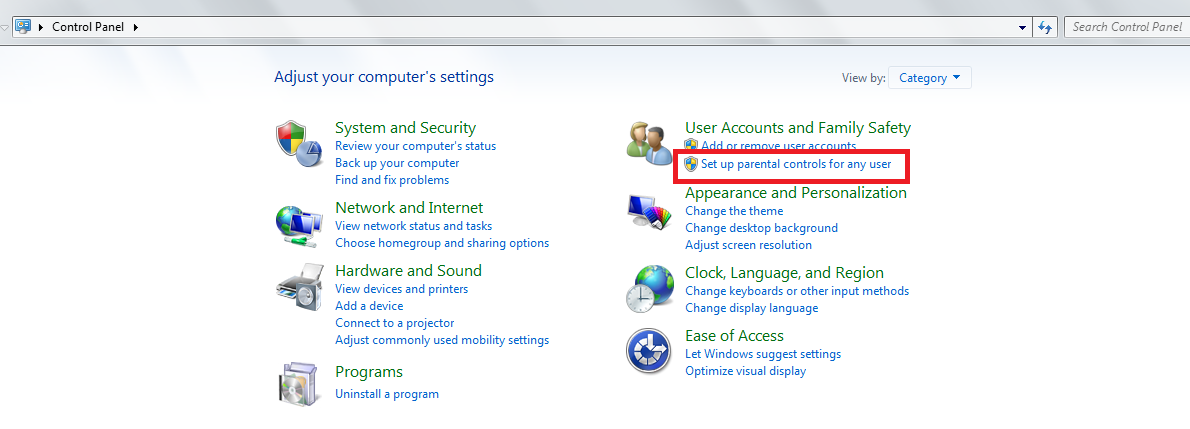
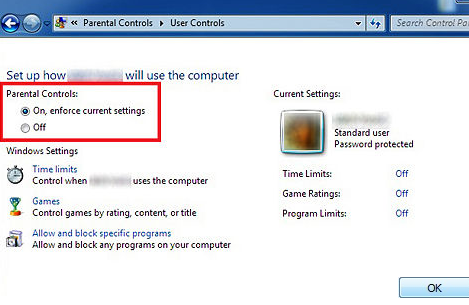
This is all guys. Hope you like my post. Please give a comment about this post.Thanks
Saturday, 16 November 2013 0
Sunday, 10 November 2013

Lets start the process for how to increase speed
- At first open notepad.
- Then type the code bellow.
- FreeMem=Space(64000000)
- Now save the file as ClearRam.vbs
Sunday, 10 November 2013 0
Saturday, 9 November 2013
Pen drives or USB are quite popular in the digital world for instant transfer of data. Using USB flash drives, one can easily transfer large files from one PC to another, from PC to laptop, from laptop to TV, and vice versa. This latest technology has made our work easier than before. In current times, you can move Gigabytes of information into just a tiny pen drive within few seconds.

In recent years, a lot of changes has been made in storage devices. When you compare new pen drives with the older ones, you will notice a considerable high transfer rate in the latest ones. However, there are times when you can get irritated with slow transfer speed of pen drives while copying data in pen drives. Well, this article shall provide you with some tricks using which you can speed up transfer rate of your pen drive.
Before knowing the tricks, we shall have a look at some factors responsible for data transfer rate , and they are as follows.
1.Pen drive ageing: Well, this is common for any device that when it becomes old, the rates gets slower.
2.Type of files: The transfer rate of data also depends on the file type; you might have noticed that songs, videos and documents take very less time in transfer while application files need more time.
3.USB port version: The most popular version of USB is 2.0, and it will give you 35mbps speed. So, if you want fast speed then buy 2.0 version pen drives.
1.File system should be NTFS: If you want to Speedup Your Pendrive, then make sure you have NTFS as file system. You can do so by Right clicking on your pendrive and selecting Format,Select NTFS File system, Uncheck Quick Format And Click On Start.
2.Disk errors: To check disk errors go to the properties tab of your pen drive, then select ‘tools’ tab. You will find a ‘check now’ button, click it and then hit ‘start’ to fix the errors. The time taken for scan depends on the size of the pen drive.
.png "speed up your pendrive")
4.Format: This is one of the effective options that many users have tried. When you have used your pen drive for quite a long time, you can speed it up by formatting the device.
The above mentioned were few tricks though big advantages for the speeding of your pen drive. Carefully test your pen drive with the factors given above, and then follow the tricks to Speedup Your Pendrive to a greater extent. In addition to this, you should keep checking for these aspects regularly, say twice or thrice in a month
Saturday, 9 November 2013 0
Thursday, 7 November 2013

The last thing you want is to finish the process and end up with an unusable pendrive .
Here is a quick step by step guide to Format an unformatable Pendrive

Please share it with your friends and give comments if any queries........ thank you.
Thursday, 7 November 2013 0
Friday, 1 November 2013

Friday, 1 November 2013 0
Monday, 28 October 2013

Monday, 28 October 2013 0
Saturday, 26 October 2013

Saturday, 26 October 2013 0
Wednesday, 23 October 2013

Wednesday, 23 October 2013 0
Sunday, 20 October 2013
You can Change the color of folder using Folder Colorizer.Its the best program to change Color Folder.

The Awesome thing in Folder Colorizer colors that you can apply easily by clicking on the file that you wish to right-mouse clik and then choose the color you wish to apply.
Sunday, 20 October 2013 1
Friday, 18 October 2013
With the rise in the social media, we are continuously seeing people are giving more significance to branding. The branding starts from the Facebook Cover, personalized twitter background, but that’s not all. While sharing anything on their social profile most of the top companies always prefer small URLs instead of Long Tail URLs. For example, BuySellads uses “bsa.ly”. If your site is hosted at Blogger.com, then we have good news for you. To get a slim small URL for your content, there is no need to rely on a Third-party URL shorting services. Fortunately, Google provides a Free-to-use URL shorting service that does the job quite brilliantly. Therefore, today in this article, we will Show How to Create Short URLs for your Blogger.com Blog Posts?

Friday, 18 October 2013 0
Tuesday, 15 October 2013
2. Open Command Prompt with admin rights. Use any of the below methods to open Command Prompt with admin rights.
- Type cmd in Start menu search box and hit Ctrl+ Shift+ Enter.
- Go to Start menu > All programs > Accessories, right click on Command Prompt and select Run as administrator.
3. You need to know about the USB drive a little bit. Type in the following commands in the command prompt:
First type DISKPART and hit enter to see the below message.

Next type LIST DISK command and note down the Disk number (ex: Disk 1) of your USB flash drive. In the below screenshot my Flash Drive Disk no is Disk 1.
Tuesday, 15 October 2013 2
Monday, 14 October 2013

Monday, 14 October 2013 0
Saturday, 12 October 2013


Saturday, 12 October 2013 0
Wednesday, 9 October 2013
What is team viewer:
It is a Remote desktop utility. by using it u can remotely access any computer by sitting on your computer system.both parties connect to a server which sets up a session between both.
How team viewer works:
- One person opens up teamviewer and calls person B.
- Person A gives the ID and password to person B.
- Person B puts this information in teamviewer and hits connect.
- now person B can access person A computer.

Requirements to use team viewer:
- First of all install team viewer ( Click to Download TeamViewer )
- Both parties must have team viewer
- Open team viewer
- Inform second party to open it too.
- Ask them there team viewer id and password (password changes every time you open team viewer) if you want to acces there system or give them your password and id to allow them to access your computer system.
- type in there id and password. if you want to access there computer system.
- Click on " Connect To Partner "
- now you are all set to access second party computer system.
Wednesday, 9 October 2013 0
Sunday, 6 October 2013

- Click on this LINK.
- Now this link will redirect you to the Facebook Feeds .
- There Scroll to the bottom and click on "Join Waiting List" button .
Sunday, 6 October 2013 0
Wednesday, 2 October 2013

As we all know very well that the torrent runs on its own server so that some time it give less speed. But today I am going to show you how to download torrent file through IDM . It’s very easy just follow some steps, I will show you how you can do So, to download torrent file using IDM, follow the steps below...
Wednesday, 2 October 2013 0
Saturday, 28 September 2013

2. Click Download a copy of your Facebook data.
3. Choose Start My Archive.
4. You should receive a security message indicating that the archiving process has started.
5. Use the email to download all your data.
Saturday, 28 September 2013 0
Wednesday, 25 September 2013
- By removing the CMOS battery
- By using the motherboard jumper
- By using MS DOS command
- By using Backdoor BIOS password

It'll reset all BIOS settings as well as the password and you'll need to Re-enter all settings.If it fails, then try to remove the battery for at least one hour.
Wednesday, 25 September 2013 0
Monday, 23 September 2013

Monday, 23 September 2013 2
Saturday, 21 September 2013
Now navigate to
HKEY_LOCAL_MACHINE\SOFTWARE\Microsoft\Windows\CurrentVersion\Authentication\LogonUI\Background

Now open the path C:\Windows\System32\oobe\info
Now copy paste your own image to this folder and rename the image to “backgrounddefault.jpg”
Saturday, 21 September 2013 2
Monday, 16 September 2013

- Highly responsive nature
- Clean and cool layout
- Simple
- Attractive checked background
Monday, 16 September 2013 0
Sunday, 15 September 2013

Sunday, 15 September 2013 0
Saturday, 14 September 2013

Saturday, 14 September 2013 0
Friday, 13 September 2013
JPStation is a free but feature rich and premium quality responsive template for Blogger which has been adapted from WordPress by IVYthemes.com. It is one of the best Blogger templates which I have ever found. Traditionally, Blogger is less diverse in providing feature rich templates and most of the popular Blogger templates are commonly adapted from WordPress.

- The template is fully responsive
- Tabbed widget on sidebar lists popular posts, latest posts, comments and labels in one place
- Clean background makes it easy for your visitors to read text
- Brilliant look of the template gives your blog a professional look
- The template is light and loads quickly
Friday, 13 September 2013 0
Wednesday, 11 September 2013

Wednesday, 11 September 2013 0
Tuesday, 10 September 2013

Tuesday, 10 September 2013 0
Thursday, 5 September 2013

myFC Power Trekk charger uses water as a source for creating electricity. The device based on the Fuel Cell technology and can produce electricity power by itself.
Source: Best Selling Products On Amazon
Thursday, 5 September 2013 0
Wednesday, 4 September 2013

-20,400 GB of global IP data transferred.
-70+ BotNet Infections.
-12 New victims of identity theft.
-3+ New Wikipedia Articles published.
-102 Million Emails sent.
-700 new Mobile Users.
-25.000 App downloads.
-$45,000 sales on Amazon.
-31,141 hours of music played on Pandora.
-55+ New linked in Accounts.
-Over 10 Millions photo.
-Views, 3500+ Photo uploads on Flickr.
Wednesday, 4 September 2013 0
Monday, 2 September 2013
Monday, 2 September 2013 0
Sunday, 1 September 2013

Sunday, 1 September 2013 7


